ALPHA CENTAURIP L U G I N S
EN
EspañolEnglish简体中文Português (Brasil)

RRRRUM / CHANNEL STRIP

Elevator 33

Build the path of your voice.

Use microphone color profiles, preamp, EQ, compression, Dynamics Lab, de-essing, three resonance bands and output shaping. The documented build includes five skins.

v0.5.1 · macOS 12+ · Apple Silicon / Intel · AU / Standalone app

Join the waitlist ↗How to install ↘

Waitlist open · Downloads at release

COMPILACIÓN DE CINCO SKINS · v0.5.1

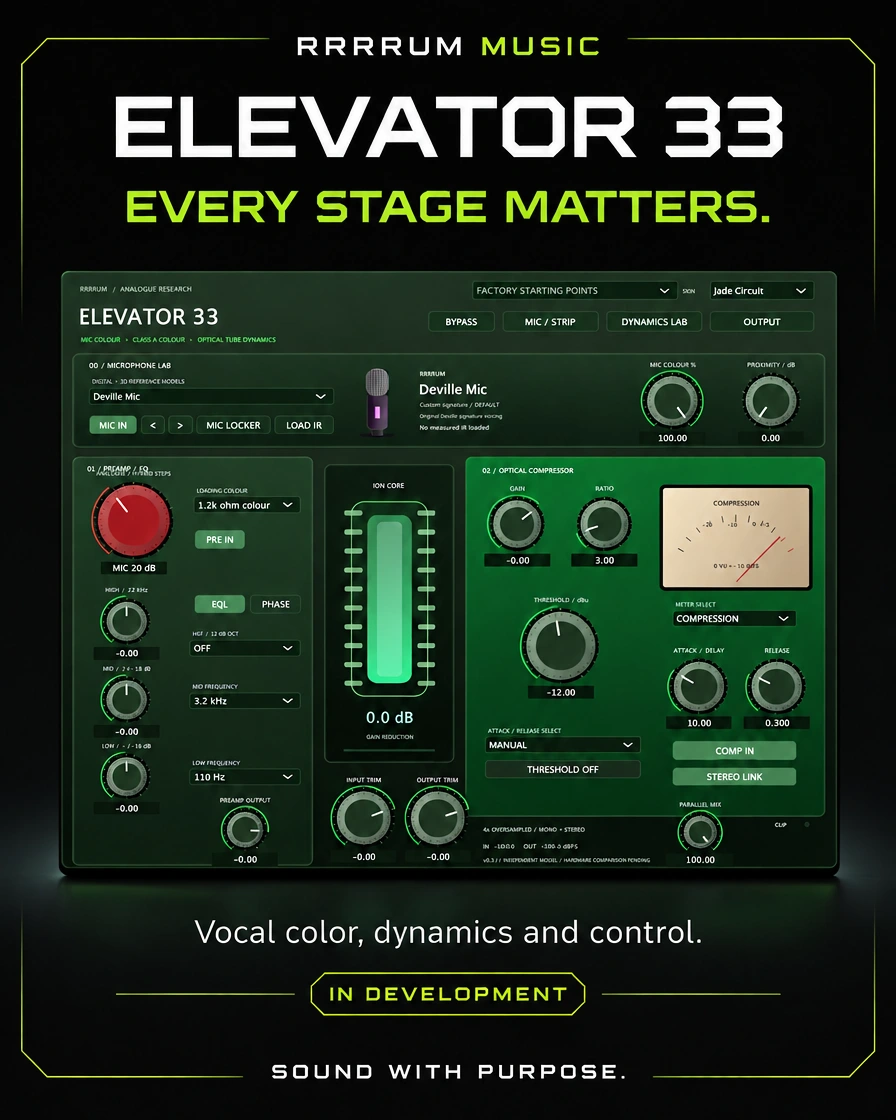
RRRRUM Music campaign banner for Elevator 33
RRRRUM MUSIC / ELEVATOR 33

OVERVIEW / VOCAL CHAINS

Color, dynamics and polish in one vocal chain

Channel strip with color profiles of microphone, preamp, EQ, compressor, Dynamics Lab, de-esser, three resonance and output bands. The delivery documents five skins.

Explore the usage flow, controls, and specifications of this version before choosing it for your session.

User manual v0.5.1 · Source page 1 ↗

FEATURE HIGHLIGHTS

Key features

The interface is implemented

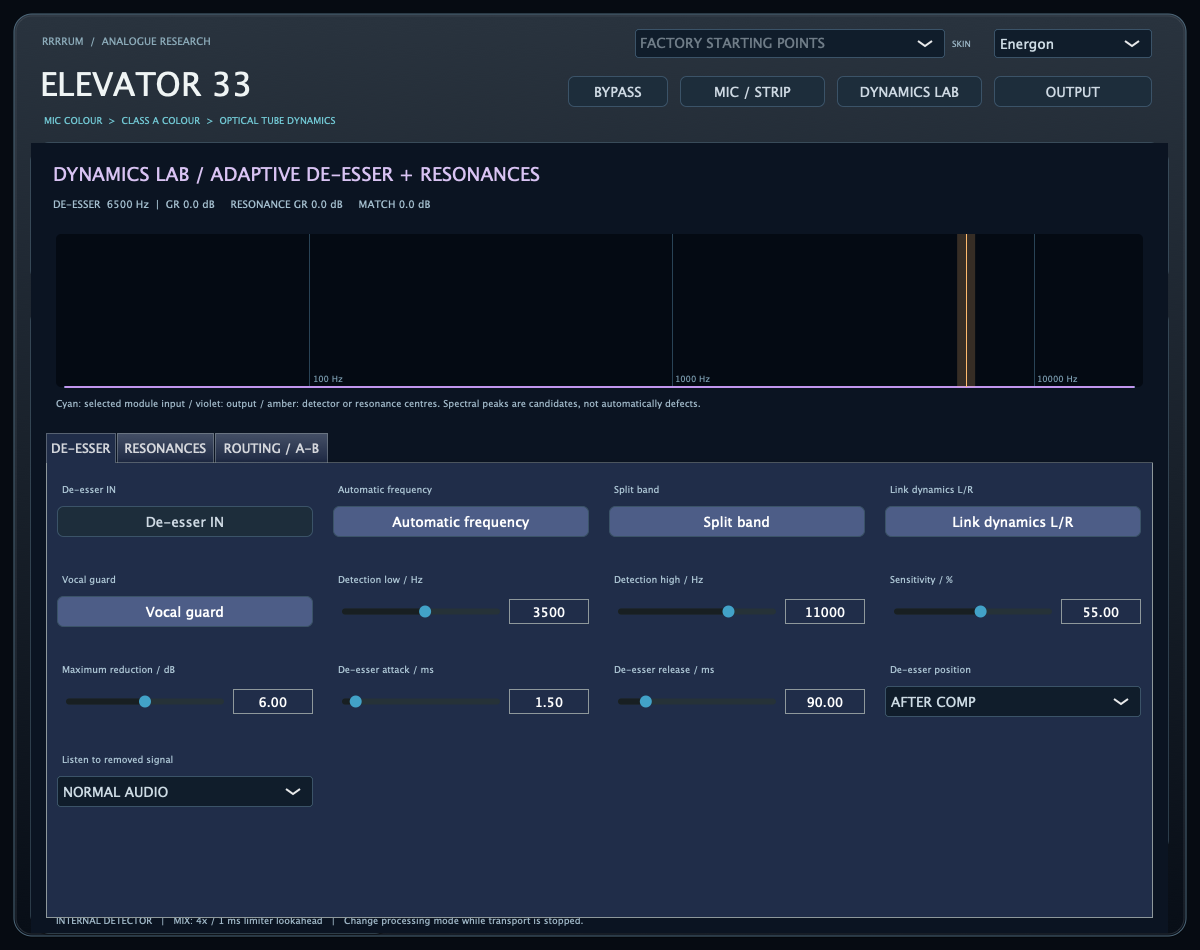
Plugin interface

See full size —
Documented interface of Elevator 33 v0.5.1
Capture the local compilation 0.5.1 of five skins. The data set shall be validated by the competent authority. The image is a static capture of the product.

A/B · ALPHA CENTAURI

Hear the difference

Comparison using a synthetic test signal and the plugin’s render.

A · Original

B · Processed

How to Start

Quick start

User manual v0.5.1 · Source page 2 ↗
  1. 01

    Choose a preset as the starting point and define the mode with the transport stopped.

  2. 02

    Adjust color, EQ and compression according to the shot.

  3. 03

    Activate De-esser or Resonance at Dynamics Lab if you need them.

  4. 04

    Compare A/B to Level Match and check the delta signals.

  5. 05

    Go back to Normal Audio and keep the session status.

CONTROLS GUIDE

Control guide

User manual v0.5.1 · Source page 2 ↗
Color / Preamp / EQ / Compressor
Character trajectory and dynamic control.
De- being
The frequency of the vehicle is the frequency of its operation.
Resonance
Three frequency bands, Q, depth and threshold.
Other information:
External source or internal detector as configured.
A/B / Recall / Level Match
Full snapshots and limited RMS compensation.
Recording / Mixing / Output
Quality, lookahead and control of the final stage.

TECHNICAL SPECIFICATIONS

Technical specifications

macOS 12 or later; Apple Silicon and Intel; AU and app by catalog. The new five-skins compilation does not declare auval/Logic validation.

User manual v0.5.1 · Source page 3 ↗
Formats
Audio Unit and documented independent app.
Design
5 skins; captured 15 views of the local compilation.
Presets / Automation
11 start presets and 69 automated parameters.
Recording
2x and zero lookahead of the limiter.
Mixed
4x and 1 ms of lookahead; reports actual latency to the host.

The next step is to

Known limitations

  • Own colour models and DSPs; no exact equivalence with microphones or hardware.
  • The measurement is not presented as certified; true peak is a separate estimate.
  • Changing Recording/Mix during playback may cause a brief interruption.
  • The auval/Logic validation of the five-skins compilation remains pending.

The appendix to 0.5.1 documents rendering of 15 views of a local compilation; it does not declare a logical auval or music session for that compilation.

Keeping and Continuing

Compatibility

Full A/B snapshots, including IR, are retained with the session. Level Match compensates RMS in a narrow way, it does not guarantee perceptual equality.

Please see the original installation manual, package signature and license notices for this delivery. Compatibility and validation vary by product.

ALPHA CENTAURI / MACOS

How to install

  1. Save your project and quit your DAW before installing or updating.
  2. Unzip Elevator-33-0.5.1-macOS-Universal.zip and copy Elevator 33.component to ~/Library/Audio/Plug-Ins/Components/. In Finder, choose Go → Go to Folder. Create the folder if needed.
  3. Reopen your DAW and find Elevator 33 as an Audio Unit. If it is missing, rescan it in your DAW’s plug-in manager.
  4. To use the standalone version, copy Elevator 33.app to Applications.

Version 0.5.1 with five skins. This build is still pending validation in Logic.

This package is not notarized by Apple. If macOS blocks it, read the system security notice before proceeding.

Technical documentation

User manual

Elevator 33 · v0.5.1 · English

Translated edition with the original interface captures.

Read the manual online

Translated text organized by original page.

Source page 1
Elevator 33 User manual · v0.5.1 (cinco skins) Channel strip with color profiles of microphone, preamp, EQ, compressor, Dynamics Lab, de-esser, three resonance bands and output stage. macOS 12+, Apple Silicon and Intel. AU and independent application. Scope of this version Own colour and DSP models, without exact equivalence to microphones or hardware. The last five skins source is compiled to obtain actual screens; validation within Logic pending. Captures generated from the local compilation of the last 0.5.1 source with five skins; not presented as Logic captures.
Source page 2
Operating guide Elevator 33 v0.5.1 This delivery contains the source code and compilation tools for Mac. It does not include a `.component` already compiled or notarized. What was added - Adaptive de-esser with spectral input/output display, detection centre and reduction in dB. - Automatic/manual frequency, sensitivity, maximum reduction, attack/release, full/divided band, voice protection and stereo linkage. - Delta listening: reproduces what removes de-esser or sound control. - Three independent dynamic bands of frequency, Q, depth and threshold resonance. - De-esser before or after the compressor. - Compressor detector filter and mono/stereo external sidechain input. - Full A/B snapshots with IR included and automatic RMS compensation limited to ±12 dB. - Momentary, short and integrated LUFS, plus end-measurements and waveform. - Recording: 2x and zero lookahead of the limiter. Mix: 4x and 1 ms of lookahead. Both modes report their actual latency to the host. - 11 start presets and 69 automatable parameters. How to compile and install 1. Unzip the folder on your Mac and close Logic. 2. Open `Build-and-Install-Mac.command`. It needs CMake 3.22+ and Xcode Command Line Tools; the script reports if any are missing. JUSCE is already included. 3. The script compils, runs the tests, installs the AU for your user and runs `auval`. 4. Open Logic > Audio FX > RRRUM > Elevator 33 and then move to the next level. To repeat the verification, use `Verify-Mac.command`. Use of the product Open DYNAMICS LAB and activate De-esser IN or Resonance IN as you wish to correct. New functions are turned off in the initial preset. Combined presets allow you to listen to complete strings as a starting point. Save A and B before using RECALL. Activate Level Match to reduce the volume difference; let play a few seconds to stabilize. It's a shortened RMS compensation, not a guaranteed perceptual equality. Snapshots are saved with the session. For external sidechain, select the source in Logic and enable the bus. The display differentiates enabled external bus and fallback from the internal detector. An enabled but silent bus doesn't fire the external compression. Change recording/mix with the stopped transport. Filters and buffers are reconstructed and there may be a brief interruption if you change it during reproduction. In OUTPUT you can see the final audio after the effects, gain and limiter. Remember to go back to normal audio after you hear a delta signal. What has been verified and what is missing They passed audio tests of the modules, full flow, A/B storage, measurement, parameter changes and modes. LUFS was contrasted with an independent calculation using published coefficients and a signal of variable levels and silence. WAV examples and graphics are synthetic signals processed by the actual DSP, not recordings of your voice. Run the interface/host tests on Mac, compile the Audio Unit and validate session playback and recovery in Logic. The scripts are included. No certification of meters or exact equivalence with commercial hardware or plugins is claimed. Microphone models are color approximations; Vocal Guard uses signal analysis and may require adjustment. The limiter controls sample peaks; true peak is a separate estimate.
Source page 3
I'm going to get a new one. Open the START-HERE-MAC.command to compile, test and install. The records are stored in the QA folder. The installation checks both architecture and the local signature; if it fails, it reverses the installation and keeps a copy of the previous component. The restoration of damaged IRs (now restoring identity to the host's actual frequency) and the change of mode were fixed, which no longer restarts a processor suspended by the host. The quality notification from automation only writes an atomic flag; the reconstruction is done on the message thread. Native testing now goes through the 11 presets and verifies these cases. State of the available file New source compilation 0.5.1 of five skins recovered from the chat. The results of the 15 views were verified; no auval/Logic validation of this compilation is declared. The original source received is also included.
PDFElevator 33User manual / v0.5.1

3 pages · Original document