Translated text organized by original page.
Source page 1
HARMONY 33
User manual · v0.11
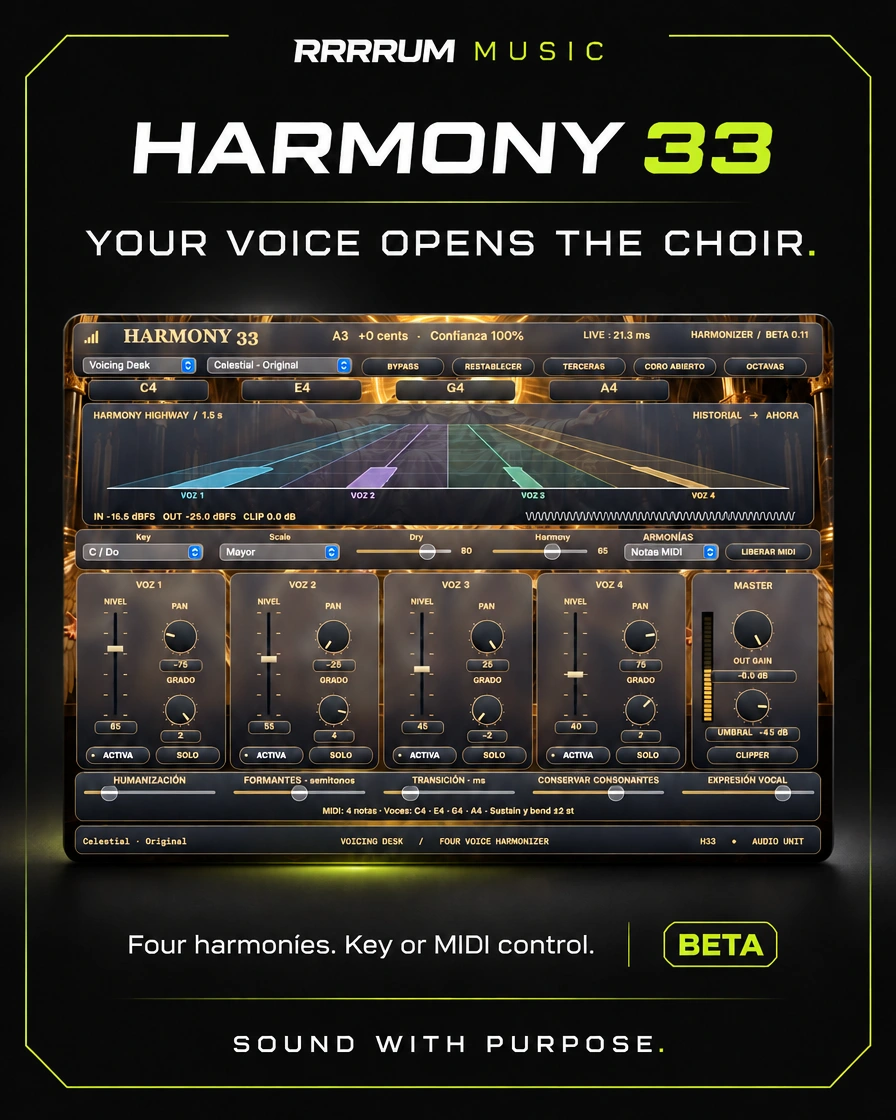
It generates four harmonies from a monophonic voice by tonality or MIDI notes; it incorporates Voicing Desk, Harmony Highway and different designs and skins.
macOS 12+, Apple Silicon and Intel. AU, Studio/Live and MIDI variants.
Scope of this version
Routing and listening inside Logic are still pending. The Live and Studio variants have different latencies. Four internal voices, no independent vocal outputs.
Capture the implemented editor; it's not a capture of Logic.
Source page 2
Operating guide
Harmony 33 - CELESTIAL CHOIR · BETA 0.11 Audio Unit for macOS 12 or later · Apple Silicon and Intel
Lock Logic Pro and open the Harmony33-0.11-Mac.pkg. The installer places the Audio Unit in /Library/Audio/Plug-Ins/Components/. If you keep a copy manually installed in ~/Library/Audio/Plug-Ins/Components/, move it out of that folder before opening Logic. The package has no installer signature or notarization.
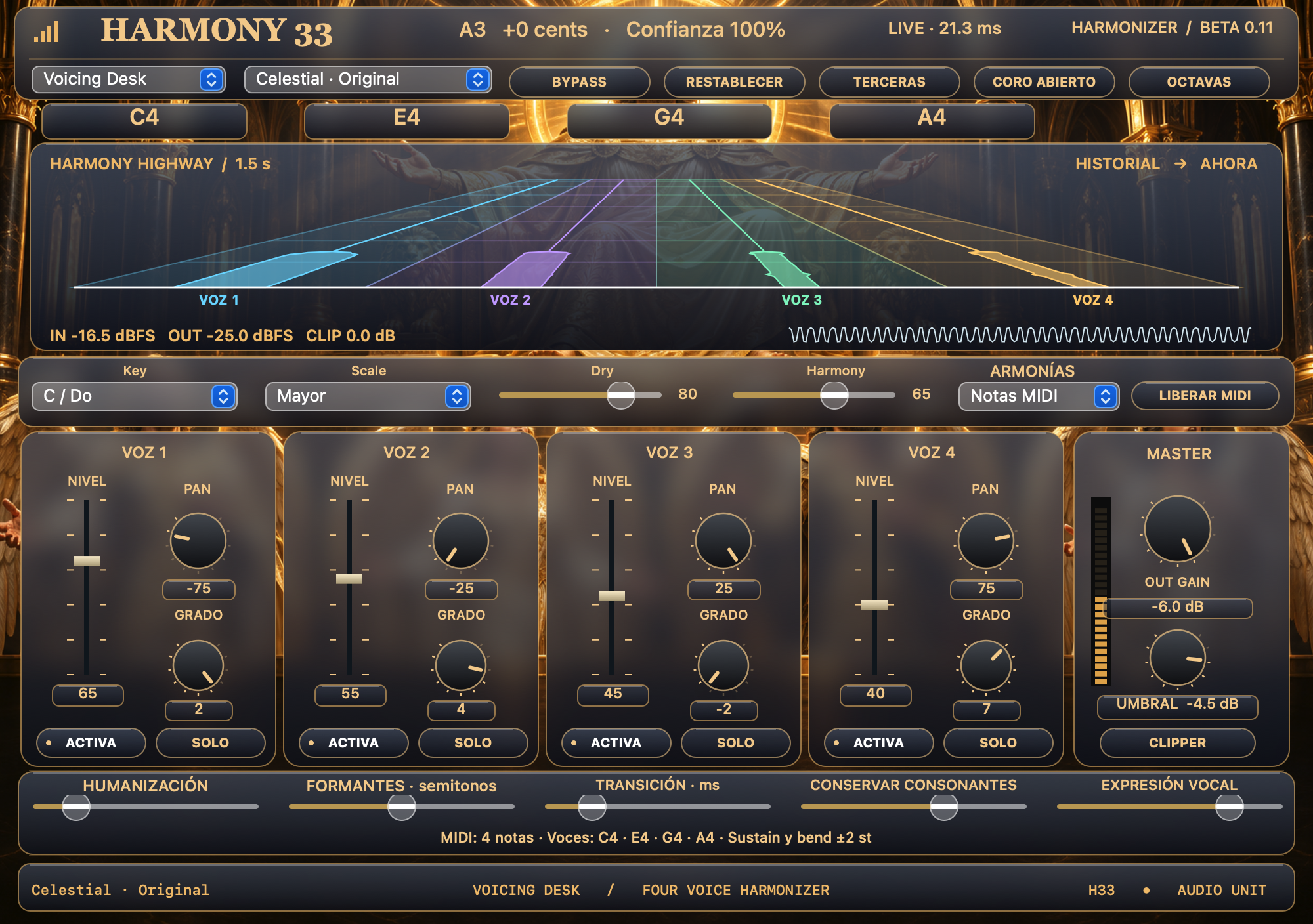
DESIGN AND SKIN Voicing Desk is the initial design of the new instances. It has objective notes aligned with the faders, a common analyzer and a segmented output meter. The first selector also offers Studio Console, Choir Engine and Celestial Press. Studio Console includes level faders and needle-shaped peak meters. Choir Engine uses four channels with color accents. Celestial Press combines bronze, Burgundy and gold engravings. Use the second selector to match the design with any of the ten historic skins or original Celestial. In
The voice desk, the illustration takes up the entire panel and the controls work on it. Modules, buttons and readings use translucent glass with reflections. The illustration is blurred behind the cards. Both selections are saved for instance. In previous sessions the skin is kept and the Studio Console is assigned.
The Harmony Highway Voice Desk shows four lanes in perspective. Each tape follows the actual level of a harmony after mute, solo and Harmony mix, before panoramic and exit stage. The bottom line of the lane is the present. The upper section shows the 1,5.5s history. Below is a trace of the vocal entry. The analyzer tracks the processed audio and does not display future project notes.
Main Analyzer shows the last 192 ms of input and output, peaks in dBFS and clipper reduction. The entrance is blue and the exit takes the color of the skin. Out Gain adjusts the level of the entire mixture before the clipper. Clipper activates hard cutting. Its crankcase fixes the ceiling between -24 and 0 dBFS. The clipper starts off. Pull the beads vertically. Shift allows fine-tuning and double-clicking returns the initial value. Leave the pointer on a control to check its function and range.
Choose your way to insert the plugin
• Celestial (Studio): normal audio effect that retains the beta 0.1 identity for previous sessions. Use it to mix or when the source is severe.
• Live: normal audio effect with less delay. Use it to test your voice while you sing.
• Studio MIDI / Live MIDI: variants for tracks that can send MIDI and audio to the same Audio Unit.
Studio: 2048 samples, 42.7 ms at 48 kHz (46.4 ms at 44.1 kHz). Live: 1024 samples, 21.3 ms at 48 kHz (23.2 ms at 44.1 kHz). These values are processing delay, proven with impulses. The program and audio interface add their own delay. Detecting the first note after silence also requires voice analysis: ~43 ms in Live and ~85 ms in Studio at 48 kHz with test tones. Live applies a longer analysis to the serious notes, with a gradual transition between the
123 and 139 Hz and the same output delay. It changes variant when inserting the plugin to maintain fixed latency compensation.
Tone-in-heaven or live on a track with one voice. In Harmonies, choose By Tone, then Key and Scale. Each angel has a level, a panorama, an interval, an activation/silence and only. Degree counts steps of the scale: 2 = third up; 4 = fifth; -2 = third down; 7 = eighth. Adjusts Harmony to balance the chorus with the original voice (Dry). Four internal voices are mixed into a mono or stereo output, with no voice-separated outputs.
MIDI CONTROL In the program you use, it sends a solo voice to the plugin audio and notes to the MIDI of Studio MIDI or Live MIDI. Select Harmonies > MIDI Notes. Play or program up to four notes. Each note activates a voice and its speed influences the level. The plugin shows the notes it's generating. In MIDI mode, Key, Scale and Degree do not determine
Source page 3
the objective notes. No pulsed notes, you only hear the original voice if Dry's upstairs.
Planned flow in Logic Pro: create an instrument track, search Studio MIDI or Live MIDI under AU MIDI-controlled Effects > HARMONY 33 in your instrument slot, choose the vocal track in Side Chain and play or draw notes in the instrument track. If the original voice is duplicated, download Dry to HARMONY 33, or adjust the routing of the original voice.
MIDI 1.0 messages: note-on/off, speed, sustain (CC64), pitch bend of ±2 semitones, CC120/123 and reset of CC121 controllers are supported. If a note is still ringing, use release notes mid. When playing more than four notes simultaneously, the four most serious notes are given priority. Displacements of up to three octaves from the source are permitted; use chords within that range.
FOR A MORE NATURAL CHORUS
• Transition: Adjust the smoothness with which the voices change pitch. Test 30-50 ms for tied settings; low values respond faster.
• Conserve consonants: incorporate some of the original articulation when the detector finds little periodicity. It goes up if you lose consonants and it goes down if you accumulate those.
• Vocal expression: more or less retains the deviation and vibration of the main voice. High values hold more than the original interpretation. The 0% option brings the voices closer to the target note; it does not modify the Dry voice.
• Formants: leave it close to 0 to preserve the character of the voice. Move it if you're looking for darker or lighter voices.
• Humanization: adds a small drift of different tuning to each voice.
VALIDATION AND ALKANCE All four variants were tested in a local Audio Units host, the pulse delay, MIDI chord reception and controls, 65-880 Hz tone detection, mono stereo audio and the reading of saved parameters of 0.1. The frequency of synthetic vowels was compared with the previous version. See tests.txt. A real vocal recording with four MIDI notes was processed at a local host. It remains pending to verify the routing and perform the listening inside Logic Pro.
Celestial art preserved from Harmony 33 Beta 0.1. Source/build.sh compiles the Audio Unit; Source/test.sh runs the tests and generates Interfaz.png.
 ALPHA CENTAURIP L U G I N S