Translated text organized by original page.
Source page 1
TAKE X
VERSION 1.1.0 / Selection and assembly of the best takes
Compare up to eight takes and build a non-destructive assembly. It includes editable local transcription and automatic editing that suggests phrases by technical criteria and continuity, always reviewable.
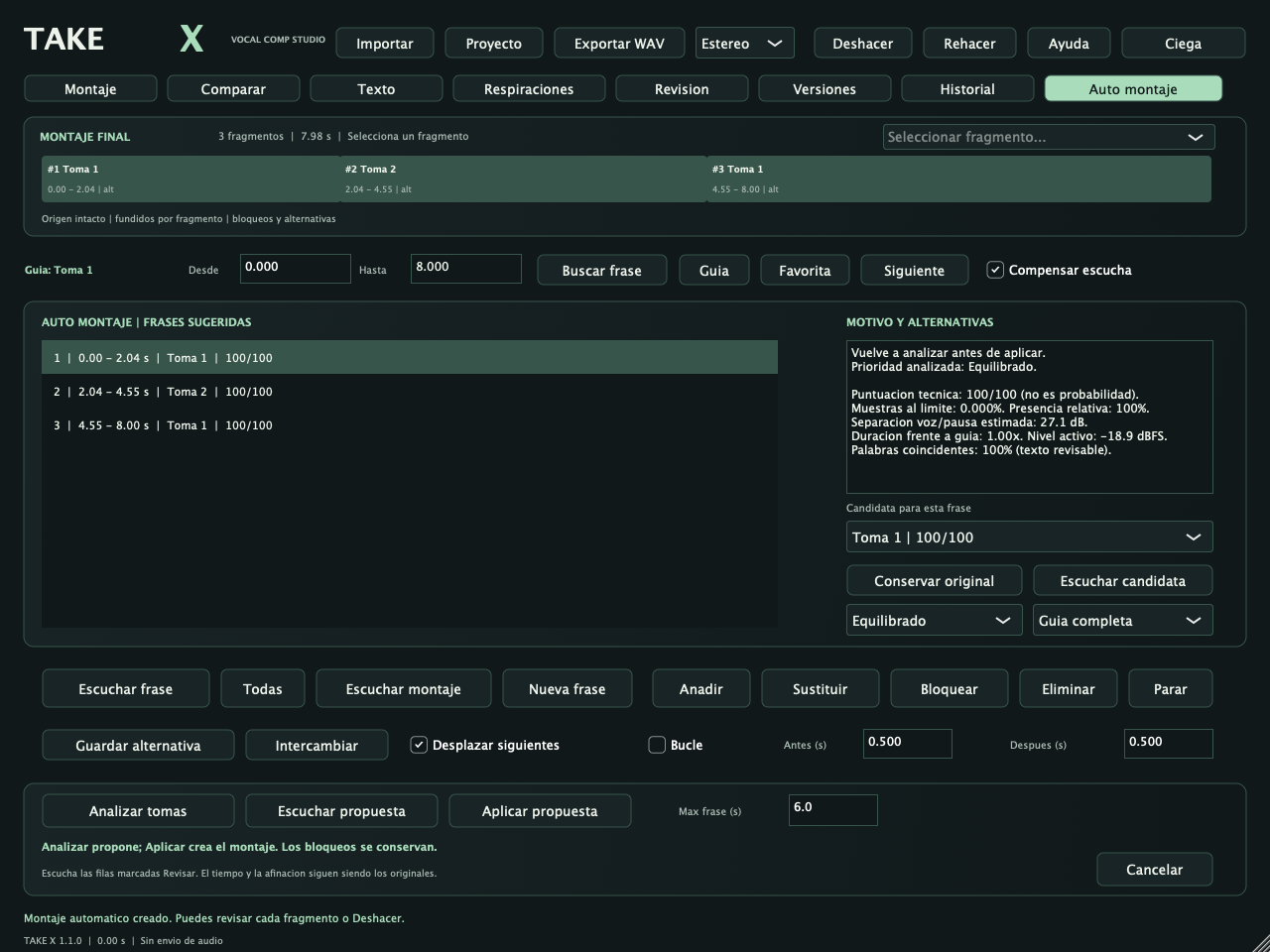
Functional native interface of this version. The data visible are test examples; the full PNGs are in Displays.
What’s included
• Context comparison, blind listening, favorites, alternatives and blocks.
• Local editable text, breaths, versions and provenance by fragment.
• Self-assembly with cleaning/continuity priorities, motifs and review per phrase.
Supporting files: the local catalogue includes complete native catches, original logos and technical manuals. Empty views show real controls; audio examples come from testing. See also the validation of this version.
Source page 2
Quick start
1. Import the takes, choose a guide and locate comparable phrases.
2. Compare in context or open Auto-assembly to get a proposal.
3. Review each motif; change candidates or keep the original.
4. He applies, he listens to the assembly, he adjusts breathing and blocks decisions.
5. Save .takex portable and export WAV with CSV source, text and automatic report.
Saving your work
.takex portable includes audio and decisions; it is also saved linked with audio footprints.
Before you start
Automatic suggestions don't value emotion or artistic superiority. It does not stretch or fine-tune phrases and does not place regions in the DAW. The transcript of the song may require correction.
General compatibility
Mac Apple Silicon, macOS 13.3 or later Audio Unit, VST3 and independent application. Installers do not have Developer ID signature or Apple notarization; binaries are ad hoc local signature. Local processing.
Complete operation and controls reference
INSTALLATION
Open TAKE-X-1.1.0-macOS-AppleSilicon.pkg, follow the installer and restart your DAW. Install /Applications/TAKE X.app, /Library/Audio/Plug-Ins/Components/TAKE X .component, /Librory/Audio/ Plug-Ins/VST3/TAKE X.vst3 and documentation/sources in /Library /Documentation/TAKE X
After checking the source. Don't turn off the Gatekeeper. It has not been tested on Mac Intel; this installer contains exclusively arm64.
NEW IN 1.1.0: AUTO COMP
The new Auto-assembly view suggests phrases from takes with technical reasons, alternatives and cleaning or continuity priorities. You can listen to the proposal before you apply it, keep the original phrases and unpack the whole thing in one step. Respect blocks and maintain backup when optimizing an existing assembly. Please see AUTO-MONTAJE.txt for scope, criteria, storage and limitations.
GETTING STARTED
1. Import: Up to 8 WAV, AIFF, FLAC or MP3 mono/stereo of the same section. You can also drag files to the editor. The takes shall contain comparable content. The editor keeps samples of each shot on its 48 kHz clock.
Source page 3
2. Select a row and press Guia. With the audio map you get approximate acoustic correspondences. Alternative: transcribe each shot, correct your words and use Map by word. Phrases are located: the audio is not stretched or tuned.
3. Drag over the guide wave to mark the phrase, or type From/Up and press Search phrase. Check the limits of each alternative at the inspector; adjust the map's delay if necessary.
4. Listening to a phrase uses the same before/after context as the guide. Compensate listening approaches RMS active level (not LUFS), limited to ±12 dB and peak. It doesn't change the export earnings. Blind hides names and mixes the order; next goes through the letters. All play in normal order, with 250 ms between candidates; in blind mode, Next is used. Favorite marks this alternative to the current phrase; a new search restarts those favorites.
5. Anadir builds the final assembly, with initial overlap of 10 ms and editable meltings. Click on a snippet above to select it (or use your selector); then click on another snap and Replace. The original remains as an alternative. Save Alternative and Interchange allow for comparison of reversible decisions.
6. From/until time in the source. Destiny is the time in the assembly. The product is then sold to the manufacturer. The inspector confirms the limits. Blocking protects selection, deletion, substitution, gain, attenuation and chain movements. It's explicitly unlocked to change them.
7. Text: select a shot in Editing, switch to Text, select language and Transcribe local. The words, their text and boundaries are editable; Locate the word selects that zone in the alternatives. Double click and listen. The times/probabilities are approximate; singing and noise can produce incorrect words. New letters are not generated and artistic interpretation is not automatically evaluated.
8. Breathing: list spectral suggestions (these may also be noise or consonants). Correct your times, add or remove tickets. Double click and listen without context. Insert respire uses the chosen source and inserts at the end of the selected fragment, displacing the latter and respecting blocks. The thinning stretch allows the breathing region of the selected fragment to be lowered.
9. Revision shows peaks near the limit, energy in cuts, breaks, gaps, overlaps and possible repetitions according to the available text. It's technical advice, not an artistic evaluation. It doesn't detect all the omissions.
10. Versions hold up to 16 edits and allows you to listen to versions without changing them. Loading another version requires unlocking the current assembly. Historical describes the actions of the session; Deshacer/Rehacer retains up to 32 decisions.
PROJECTS AND EXPORT
Project > Keeping portable collects Float32 audio without loss, limits, sources, correspondence, text, breaths, alternatives, tags and versions in a .takex. Save Link preserves SHA-256 routes and tracks: do not move the originals or use Relocate/Open Link looking in folder. Only the same audio is accepted; the file name is not enough. A project with no means is opened without replacing them silently. Relocate before export/storage. The DAW session keeps metadata, paths and
reference to the last .takex; does not include audio within the AU/VST3 state. Save a portable .takex to move it. The history of undoing only lives during the current session; versions and provenance are kept in the project. Exporting WAV produces 48 kHz/24 mono or stereo bits and two reports with the same name: .origine.csv and .texto.tsv. Don't overwrite the source footage. The text only includes available words whose beginning falls within each fragment. Exports exceeding 0 dBFS are rejected: low assembly gain.
Source page 4
ACTUAL SCOPE
Offline editor with its own preview. AU/VST3 lets the input pass when there is no pre-listening; while you listen, its output plays the editor. The app alone remains silent when it stops to avoid the return of the microphone. It does not record new takes, does not use ARA, does not automatically insert regions and does not synchronize assembly with transportation of the DAW. Export the WAV and import it to the desired track. Local processing in CPU, without account, servers or downloads during use.
Transcript: Whisper multilingual base q5_1 built in. It does not offer universal precision or separation of speakers. NATURA X, DUO X, STACK X and TONE X retain their specialized functions; TAKE X is responsible for selecting and assembling footage.
LIMITS
8 takes, each 80 ms to 10 minutes; maximum total of 115.200.000 float samples (counting channels, ~461 MB). Maximum editing time is 10 minutes; 128 fragments, 128 attenuations, 16 versions, 10,000 words per take. Minimum regions 5 ms. Input audio between 8 and 192 kHz. The sequential listening of Toda is also limited to ten minutes. Acoustic correlation between takes with a duration ratio of 0.5-2 and local search of about ±4 s for the proportional progress; check limits and manually correct for letters
different, long silences or very different arrangements. It does not automatically adjust the tempo or tuning of each alternative.
SOURCE CODE AND LICENSES
The corresponding code is included in Source.zip and distributed under AGPL-3.0-only. It includes the dependencies and model files needed to reconstruct.
UPDATING FROM 1.0.0
Save your projects and close TAKE X and DAW before you run installer 1.1.0. Updates the same AU/VST3/app locations and retains the identifiers. Reopen the DAW; your previous .takex is still supported.
Source page 5
Auto Comp 1.1
TAKE X 1.1.0 — AUTO COMP
PURPOSE
Suggest a set of phrases with the most technically convenient options of available takes. It's not an evaluation of emotion, artistic intent, perfect pronunciation or tuning. It's a verifiable aid, with visible reasons. It works locally and does not require transcribing or downloading additional models.
USAGE
1. It's important to have at least two takes of the same section or song. Choose your guide.
2. Open the car assembly. In the range selector (bottom right) select: - Complete guide: generates sentences from the entire reference, with empty assembly. - Selected phrase: generates phrases within From/Up of the guide, with emptyassembly. - Current assembly: recommends replacements for its existing fragments; preserves blocks, manual breaths, gains and meltings. If you already have a setup, use current setup. It doesn't empty automatically.
3. Choose Balanced, Prioritize Cleanliness or Prioritize Continuity. Adjust Max sentence from 2 to 12 seconds as the orientation length for break segmentation. In current assembly the boundaries of each fragment are respected, no resegmentation is made.
4. Press the scan shot. Correspondence to the guide is prepared if it does not exist; use matching words when available, or acoustic analysis. The existing maps and manual stages are preserved. He doesn't transcribe on his own.
5. Select a row to see your reasons and alternatives. Listening candidate reproduces that phrase with the same context as the guide. Compensating listening remains a monitoring option: it does not alter exports.
6. The Candidate selector allows you to manually change the recommendation. Conserving original prevents that change: it preserves the guide when creating a new assembly or the current fragment when optimizing. It doesn't delete the sentence or create a gap by rejection.
7. Listening to a proposal allows you to listen to the proposed assembly without applying it.
8. Applying the proposal confirms all the changes as a single reversible decision. If there was a mount, it automatically saves Before Auto in Versions. If all 16 versions are occupied, release one before applying; no backups are automatically deleted. Disinfection/Re-making reverses/restores the change.
9. After applying, use Listen to Mounting to check the result. You can edit it with the same manual controls, save a portable .takex and export WAV.
Source page 6
PRACTICAL CRITERIA
The score of 0 to 100 is a technical heuristic; it is NOT a probability nor an artistic rating trained with professional interpretations. It includes samples near/to the digital limit, relative energy present with respect to the guide pattern, energy during guide pauses as noise approximation, duration changes, map acoustic reliability and energy at cutting edges. If both takes have a transcript, compare standard words and their accounts; you do not understand the meaning of the letter. No reward
A shot just because I'm stronger. Noise is only estimated if there are enough pause and voice windows in the guide. The estimate may confuse breaths, consonants or small correspondence errors with noise. The screen indicates when there are not enough breaks.
Balanced combines those criteria with a moderate penalty for changing source. Cleanliness increases the noise weight and reduces the cost of change. Continuity prefers to keep a shot if local improvement does not justify the jump. One selection may have fewer local points than another to improve the continuity of the set. The draws favor the current guide or source. The second technical option is retained as an alternative in the new fragments; when replacing an existing one, its former source is retained.
REVIEW AND SAFEGUARDS
Revisar is marked when there are close scores, low quality, lack of text, different font, incomplete presence, very low level, energy cuts or uncertain maps. Listen to those lines; a high score doesn't guarantee the same letter, correct tuning, total absence of noise, or better interpretation. The areas of the guide without any useful voice are preserved so as not to turn silence into noise. Up to 128 phrases and eight fonts are allowed. In long sections it may be necessary to extend Max sentence or analyze by parts. You take with you
Unlikely matches are excluded and reported; a second comparable shot is always needed. It does not change tempo or tuning or regenerate words. The fragments maintain their natural speed and duration. Fused between fonts can slightly shorten the new assembly; verify its duration before importing it into your DAW. In contiguous changes of the same source the exact continuity is preserved, without internal fuses.
The blocked fragments retain source, boundaries, gain, melt and position. Substitutions that would displace them or increase their overlap are also excluded. The breaths inserted manually are kept in current assembly. If you add blocks after the analysis, they are respected when applied. A new block that makes another substitution incompatible may require re-analysis. Changing audio, maps, text, guide, displacement or geometry of the assembly invalidates the proposal for its application:
Press the scan again. Your previous reasons are still available. Opening another session or cancelling an analysis does not publish a partial proposal. The traces of the sources are checked when retrieving projects.
SAVING AND EXPORT
The .takex and the status of the plugin save options, scores, reasons and choices. Projects 1.0.0 continue to open in 1.1.0. Use the new version to preserve suggestions; the old version does not know these additional metadata. WAV exports the applied assembly, not a pending proposal. In addition to origin.csv (with the actual origin) and text.tsv, auto.txt is written with the report of candidates evaluated if there is a proposal. A historical report can be marked as previously analysed: source.csv for
The audio is not stored within the DAW state: it keeps a portable project.
 ALPHA CENTAURIP L U G I N S