Translated text organized by original page.
Source page 1
TONE X
Version 1.2.0 / Consistency between takes and rewrites
It approximates tone, level and dynamics to a reference. Continuity matches help insert a re-recording, and section references allow for different treatment of verses, choruses and soft voices.
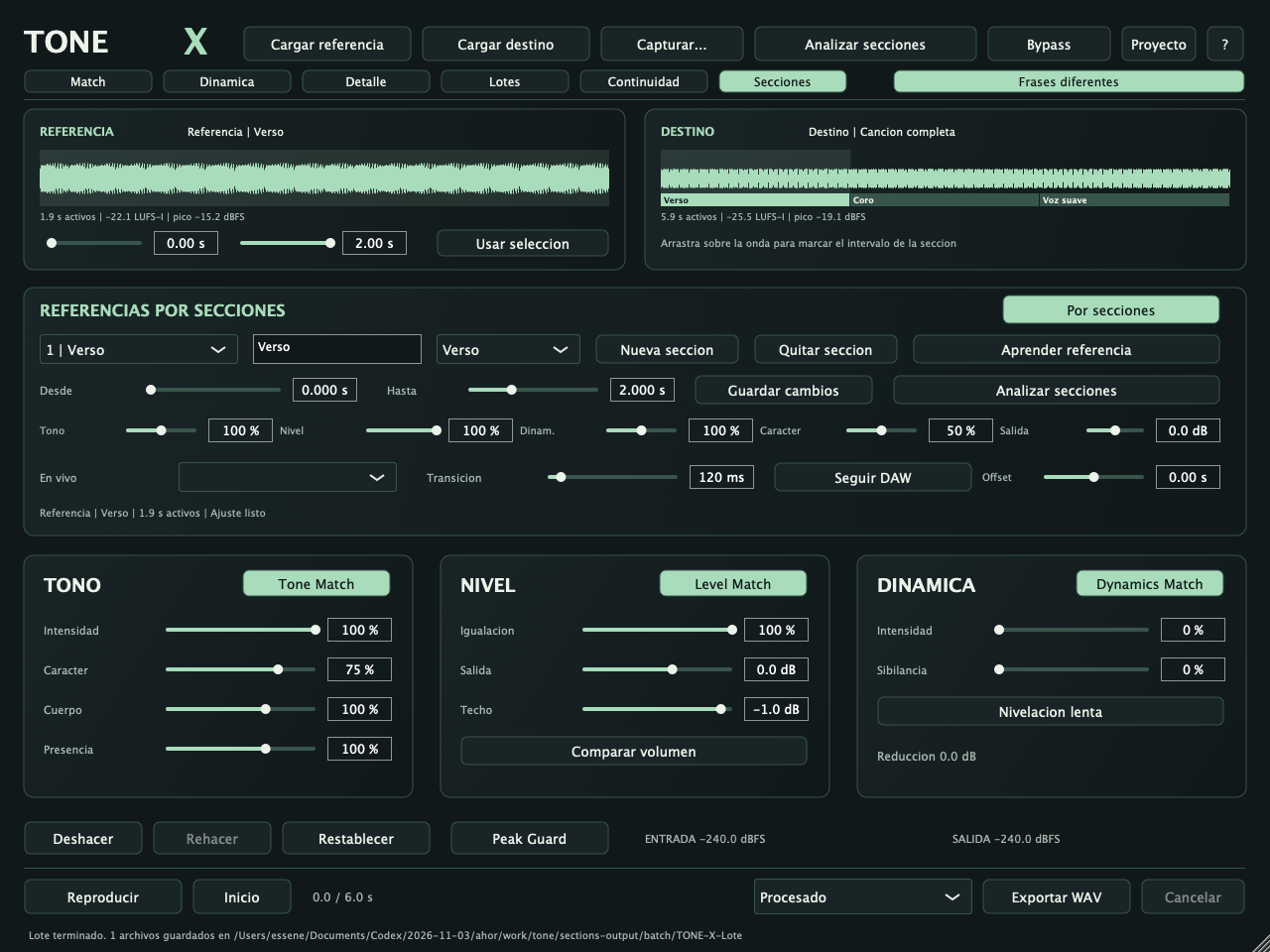
Functional native interface of this version. The data visible are test examples; the full PNGs are in Displays.
What’s included
• Tone Match, Level Match and Dynamics Match are independent.
• Continuity: re-encrypted insert with context and duration adjustment to the gap.
• Up to eight references per section, transitions and batch processing.
Supporting files: the local catalogue includes complete native catches, original logos and technical manuals. Empty views show real controls; audio examples come from testing. See also the validation of this version.
Source page 2
Quick start
1. Load Reference and Destiny and mark representative selections.
2. Press Analyze and propose; adjust tone, level and dynamics.
3. To rewrite a sentence, mark the continuity gap/insert and calculate.
4. For different styles, create sections and learn their reference.
5. Compare, save a .tonex and export the WAV or process a batch.
Saving your work
.tonex retains audio, profiles, continuity and section references; the DAW state retains the learned settings.
Before you start
The match is a statistical approximation, not identity cloning. Continuity works with a mounted insert. The sections are marked manually; it does not detect verses and chords by itself.
General compatibility
Mac Apple Silicon, macOS 13.3 or later Audio Unit, VST3 and independent application. Installers do not have Developer ID signature or Apple notarization; binaries are ad hoc local signature. Local processing.
Complete operation and controls reference
INSTALL
Close your DAW and open TONE-X-1.2.0-macOS-AppleSilicon.pkg. Install Audio Unit in /Library/Audio/Plug-Ins/Components/TONE X.component, VST3 in /Libry/Audio /Plug-In/VST3/TONE X
It has its own identifiers: it does not replace NATURA X, DUO X or STACK X. Binaries with ad hoc signature; installer without Developer ID or notarization from Apple. If macOS blocks it, check the warning under System Settings > Privacy and security. It doesn't require disabling the overall security of the team. It does not include Intel, Windows, AAX, iLok or certification in all DAWs.
MAIN WORKFLOW
1. Load a Reference that represents the sound you want to keep.
2. Load the Destiny you want to approach. He uses clean solo voices and comparable recordings/pronunciations. WAV/AIFF/FLAC and formats supported by macOS, mono or stereo, 0.5 s to 10 minutes. The files are converted to 48 kHz.
3. Define From/Up under each waveform and press Use selection. Only that part is learned; the entire original file is kept for export. Selections need at least 0.5 s; several seconds of representative voice is recommended. The profile can also be learned only with Reference to use
Source page 3
Lotes afterwards.
4. Different phrases (initially active) limit the tonal proposal to +/-3 dB. If both takes have the same sentence/record, you can turn it off to allow up to +/-6 dB in the proposal. He doesn't recognize or align words.
5. Press Analyze and propose. Compare and adjust the three modules separately. Uploading another shot or changing selections invalidates the previous proposal.
6. Reproduce, listen to Original/Processed/Differential and export when you are compliant. The result is a statistical approximation, not a copy of the vocal identity or an infallible simulation of the reference microphone.
SECTION REFERENCES — NEW IN 1.2
Up to eight sections with independent learned references. The names Verso, Choral and Soft Voice are labels/starting points: the structure of the song is not detected automatically. You mark the intervals.
1. Load the entire file you want to process into Destiny.
2. Open the sections. Define From/Up to destination (minimum 0.5 s), a name and a start preset. Push New section. Overlapping is not allowed. You can drag over the Destiny wave to prepare the interval.
3. Load in Reference a shot appropriate for that section. Mark 0.5-30 s with the selection controls or drag over the reference wave. Press Learn reference. A copy of the fragment and its profile are stored within that section. Loading another reference does NOT replace the already learned ones. You can learn different parts of the same file or use different files.
4. Create the other sections and repeat the learning. The numbered selector identifies the section you're editing. Save changes updates name, interval and intensities. Changing an interval invalidates only your adjustment to the destination; changing intensities does not require re-analysis.
5. Press the section to scan. Each section of the destination is compared to YOUR reference profile. If a reference is missing or a section cannot be analysed, no partial update is published. The function indicates the affected section. The By sections mode is activated at the end; you can turn it off to return to the global setting. The first section is selected for live entry.
6. It plays the file and exports WAV. The manufacturer and the exporter shall follow the intervals marked. In the gaps, the global adjustment is used if it exists; otherwise the global output/protection functions are maintained without matching. The file duration and tuning are not changed.
SETTINGS FOR EACH SECTION
Tone and Dynamics are 0-200% multipliers over global intensities, limited to 100% effective correction. Level is a multiplier of 0-100%.
Example: Global tone 50% x Section tone 140% = 70% effective. Character is unique to each section and replaces the global character within it. Section output (-12 to +12 dB) is added to global output, with a combined limit of -24 to +18 dB. Peak Guard is still available to protect the peaks. Module buttons, frequency blocks, Body, Presence, Sight Watching, Slow Leveling and the global ceiling are followed
Source page 4
respecting. The Verso/Coro/Soft Voice presets propose intensities; they are not voice models. Edit the values and press Save changes to apply them to the bank.
TRANSITIONS
Transition supports 20-1000 ms between intervals. The engine interpolates curves, level and dynamics and smooths the filters. The window is limited if there are very close boundaries. There's no restart effects on every cut. The Match panel curve remains the GLOBAL proposal; when activating the sections it is indicated in its title. The Destiny band and the Sections bank show the intervals and references that control the file.
LIVE INPUT / DAW
Live, select Global or one of the eight positions. It is the secActive/Active Live Section parameter and can be automated from the DAW. The profiles and settings learned work even if the interface is closed even if the original audio files are not loaded. Follow DAW uses the position in seconds when the host provides it and is in playback. The position of sections = seconds DAW + Offset.
Example: if the second 0 of the file corresponds to the second 42 of the session, use Offset -42 s. Their range is -600 to +600 s. Without a valid position in reproduction, it is used in vivo; the interface indicates this. No compasses, no verses or no choruses. The file player takes priority and uses its own file time, not DAW transport. The offset does not change the filing/exporting times. The manual selection changes are smoothed with the processor; Transition controls the DAW file/tracking time windows. The
delete a section, change the numbered positions afterwards: check the secActive automation if you have already recorded it.
SAVE / REUSE
The DAW state keeps profiles, settings, intervals and learned plans of the sections. It does not include the reference audio fragments. Project .tonex Scheme 3 also retains those Float32 fragments when available. Save .tonex while preparing to recover the reference material without relying on the original files. Change Destiny keeps the bank's references, but invalidates their plans so you can analyze the new take. Cancellation keeps the last full bank. Removal/Re-creation
Restores the references, intervals and settings of the bank. Projects 1.0/1.1 are opened with sections disabled. Continuity 1.1 assemblies are still valid. New projects do not open in previous versions: keep a copy if you need to go back. Continuity is an independent mode; it does not apply the section bank to the assembly or process the outside of its hollow.
BATCH PROCESSING BY SECTION
With Por active sections, Lotes releases the destination of each file against the bank profiles and applies the same intervals. All must have the same temporal structure/position and sufficient duration. Files that fail to comply are marked as ERROR without preventing others. The CSV indicates the gains of each section in Observations; the level_dB column corresponds to the overall back-up adjustment, if any. Without For sections, Lotes maintains the global benchmark behavior.
Source page 5
CONTINUITY MATCH — NEW IN 1.1
The mode creates a montage with a word or phrase re-encoded within the original shot. It's an offline operation: it doesn't search for words or edit regions of the DAW automatically. It works with a mount/project insert.
1. Download the full image in Reference (ORIGINAL in the Continuity tab). The recording is loaded into Destiny (REGRABACION). Recording of 80 ms to 10 minutes is allowed; for the normal Match it is still preferable to have at least half a second and several representative seconds of voice.
2. In Continuity, mark Hueco from/until the original and Insert from/untill the re-recording. You can write down the times or drag on each wave. Both intervals need at least 80 ms. Cut back on breaks when you can.
3. Context selects up to 0.5-8 s immediately before and after the hole. There must be at least half a second of audio on one side to analyze it. If one side has no useful voice, the other is used; if both fail, the calculation is rejected. Choose the voice of the same singer/speaker, without overlapping music.
4. Adjusted Cast (2-80 ms). It is automatically limited to one-quarter of the gap so that a very short insert is not consumed by transitions.
5. Press Calculate continuity or Prepare insert. The engine learns left/right context, approximates tone/level/dynamics and gently interpolates the two settings throughout the rewriting. Different phrases retain the tonal limit of the proposal; character, blocks, intensity, body/presence, level match, dynamics match, sibilisation and output continue to configure the inserts treatment.
6. Duration is adjusted to the gap with Rubber Band R3, without tone transposition. Only 0.5 to 2x ratios are allowed. It doesn't align every phoneme or word within a sentence. If the internal rhythm doesn't fit, re-cut or change cuts.
7. Compare with insert/original; Original and Difference of the listening selector also work on the timeline of the complete output. The difference shows only the change in assembly. Hears especially consonants, breaths and vowels held close to the joints.
8. Export assembly keeps the original complete with the substitution inserted, WAV 48 kHz/24-bit, same duration and channels. It doesn't just export the word.
The audio outside the void is copied without processing into the assembly buffer. The first and last sample inside the hole also match the original; the meltings are made inside the hole using a soft cosine curve. The final conversion to PCM24 entails the normal export quantification. Peak Guard protects the insert during the calculation, not standardizes the full original. In pre-hearing, you can protect the entire exit. If the original contains samples above 0 dBFS, the export of the assembly shall be
refuses: normalize it before you upload it or correct the level in your editor.
Level Match includes residual calibration of up to +/-6 dB after the tonal adjustment to better approximate the context level. The target reference gain remains limited to +/-12 dB for re-recording, before Exit. Peak Guard can lower the inserts if their peaks need protection. In fragments less than 0.5 s, repeated statistics are used only for analysis (never for audible audio), conservative limits and no proposed continuity compression. The tonal information may be insufficient: fill with more margin or
Select a larger sentence if the analysis rejects it. If original/recording have different channel numbers, mono doubles to stereo and stereo averages to mono; check the balance and phase in doing so. The time stamps of the normal Match Intent Protection shall not be moved to the inserts. In Continuity, use the
Source page 6
The character and module controls, and review the interpretation.
Changing controls, gap, insert, context or fused requires recalculating. The last assembly is still available for listening; it is indicated to recalculate adjustments and its export is blocked until it corresponds to the current adjustments. Loading another shot invalidates the assembly. Canceling a calculation keeps the final full result. Remove insert and Deshave/Re-make do not delete the originals. For several substitutions, export this assembly and use it as the original of the next; there is no list of multiple simultaneous editions in this version.
CONTROLS
Tone Match: a smoothed tonal curve, adjusted by 13 parametric filters overlapping between 80 Hz and 12 kHz. Intensity mixes the proposed correction.
Character: increases conservation through tone limits and less intervention on dynamics. It does not measure or guarantee singer identity.
Body/Presence: Weigh correction in severe-medium and acute-medium. Conserve serious/body/medium/detail/air: restrict correction in the region. Filters overlap with smooth transitions; they are not perfectly isolated spectral boundaries. Blocking the five regions cancels the tonal correction. The mint curve shows the resulting correction in dB. The grey/white stripes show the relative reference/destination profile as visual support; they are not an instantaneous reproduction analyzer nor do they share
a scale calibrated with the correction axis. Detailed numerical diagnostic shows.
Level Match: approximate fixed gain from the RMS of active windows, with a limit of +/-12 dB in the proposal. It's not standardizing to a LUFS target.
Dynamics Match: linking compression between channels, proposed ratio up to 4:1 and limited reduction to 6 dB before Intensity/Character/Local Protection. If the destination is already less dynamic than the reference, don't try to expand it.
Slow leveling: additional smooth monitoring, with changes up to +/-4 dB before intensity/protections. It's turned off during very weak windows.
Sibiron: reduces acute energy excess compared to the reference profile. It's not phonetic detection of those; it listens to consonants and air as you climb it.
The amount of the adjustment shall be calculated on the basis of the following: Roof: Peak Guard level.
MONITORING AND BYPASS
Comparing volume slowly adapts the processed listening level to the original using input/output energy. It needs a short settlement; it is not an infallible perceptual comparison nor does it change the exported file. Original plays the shot without correction. Difference allows you to hear the change from the original, including the effect of compensation if it is active. It must not be used as a restored voice. Peak Guard is still protecting the wiretap when it's active. Host bypass returns the input unprocessed. The
panel bypass is softened for a few milliseconds. Deshacer/Re-do restores changes to parameters and proposals. Changing file/selection/project restarts that history. Resetting takes the proposal away.
Source page 7
PRESERVING PERFORMANCE INTENT
In Dynamics, indicate From/To the destination, select a mode and press Protect fragment. Up to 32 marks per file. Keep soft / Keep intensity: Both preserve the local envelope by removing compression and slow leveling within the fragment. They're labels for your intent; they don't automatically classify interpretation.
Do not level: also remove Level Match within that fragment. Tonal correction and output gain remain; Peak Guard can reduce high peaks. Soft transitions of 20 ms. No time is stretched or tuning changed. The marks correspond to the time of the complete file. They are used in their pre-render/export; they do not apply to live input or to other batch processed files. Global protection character if it works live/lot.
CAPTURE AND DAW
Capture... > Learn reference/destiny record the unprocessed input up to 60 seconds. Start audio from the DAW and press Stop capture. The app uses the selected device. The audio is analyzed locally and not sent to servers. With a learned proposal, the plugin processes the mono/stereo input in real time. Declared latency: 0 samples; minimum phase filters, without lookahead. The file preview has its own player and does not follow the transport or automatically place regions in the DAW. For editing
files in your session, export and import the resulting WAVs. The independent app also offers import, capture, pre-listening and export.
SAVE
The DAW session retains parameters, profiles learned, proposal and protections. It does NOT include the complete imported files. You can continue processing input with the adjustment learned by reopening that session. Project > Save creates .tonex with full reference/destination, Float32 audio, selections, profiles, proposal, brands and controls. Use it to recover pre-hearing and export without relying on the original routes. The project does not include Lotes' file line or undoing history. In 1.1 also
includes continuity assembly and adjustment. The DAW session saves the edition settings, but not the audio from the assembly: it uses .tonex. Projects 1.0 are opened with Continuity deactivated. In 1.2 the new projects use Schema 3 and do not open in 1.0/1.1; save copies if you need to go back to an earlier version.
EXPORT AND BATCH PROCESSING
Exporting WAV produces 48 kHz/24-bit, with the channels and duration of the destination. It includes tone, level, dynamics, markings, Exit and Peak Guard. Always export the processed; excludes Original/Differential mode, Bypass and listening compensation. If the Peak Guard is turned off and the result exceeds 0 dBFS, the write is rejected to avoid silent cutting. Get out or activate Peak Guard. Peak Guard is live monitoring sample peaks. Exporting also measures an interpolated estimate of 4x and, if necessary, lowers overall gain by
I'm going to leave. It's not a true-peak limiter with a lookahead or a certified measurement product.
Lot: Learn Reference, add up to 32 files and choose Process Lot. A new TONE-X-Lote folder is created (with a suffix if any). Each shot is analyzed and received its own proposal with your global intensities/protections. It produces a WAV per take and a Report-TONE-X.csv with result and observations. A faulty file doesn't block the others. The originals are not modified. Cancellar keeps files already completed and a partial report. The time stamps of Destiny do not move to other
Source page 8
You take it. First, check files with saturated, low-powered voice or near-limit settings.
METERING AND LIMITS
LUFS-I: offline mono/stereo calculation with K-weighting and 400 ms blocks, absolute gates -70 LUFS and relative -10 LU. It is shown by learned selection. The input/output indicators during listening are sample peaks dBFS. Active voice is a selection by energy; there is no semantic recognition of voice, phonemes, microphone, room or singer. The P90-P10 contrast is a measure of active windows, not Loudness Range EBU. Spectral flatness and near-maximum samples help with the diagnosis, but not
They test a signal-to-noise relationship and do not detect all forms of distortion. It doesn't reconstruct clipping, reverberation, missing content or lost details. Different phrases, records, distances and singers need auditory revision. Long stereo files can use quite a bit of memory; lots process one by one. There's no neural learning, no network connection, no subscription or API keys. Continuity does not reconstruct phonemes, reverberation or interpretation differences. Temporary mesh can create changing artifacts
Big ones. The list of multiple Continuity inserts remains outside this version. Sections offers up to eight references at intervals, without structure detection, word alignment or automatic intent recognition.
SOURCE CODE AND LICENSES
The K-weighting formulas consulted in libebur128 retain its MIT notice included. Source.zip includes code, tests, instructions and source file JUCE 8.0.12. See BUILD.txt, DSP-INFO.txt, CONTINUITY-INFO. txt, SECTIONS-INFO.Txt, VALIDATION.txt and LICENSE.txt. Rubber Band 4.0.0 retains its GPLv2-or later license; the GPLv3 option is used in this AGPLv3 combination.
 ALPHA CENTAURIP L U G I N S